
The first film halation model that truly reacts to scene light and contrast.
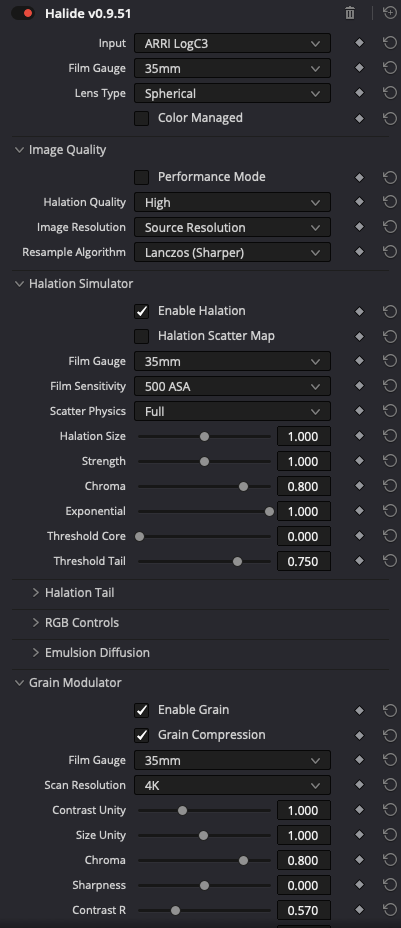
Most Halation models cap the halation in size when light gets really intense, and don’t have a good exponential fall-off. This model tries to actually simulate light scatter as it hits the base of the film, and scatters it back onto the RGB layers. It is truly a revolutionary way of getting closer to real film halation. While more research is being done, expect the model to become even better and faster over time.
The Halation Simulator module is equipped with many control points to tweak and tune the halation response. It also includes a features like Emulsion Diffusion.
Fully procedurally generated grain. The algorithm was developed and tuned for a long time, and measured agains multiple film stocks to make sure the structure can be matched.
Full RGB grain tone mapping to match any film stocks grain response, or dial it in to personal taste. The sky is really the limit.
Three luminance zones for grain size. For example large grains in the shadows and fine grains in the highlights. a feature that has been missing in almost any tool.
It also includes Film Dust, Gate Weave, Streaking.
Today we open up for a brief window to join the beta program.
From 22-02 17:00 CET until 23-02 12:00 CET
You will get an installer that can update the OFX as soon as I release a new update. You can expect frequent updates over the next few weeks so check regularly. In the email you will receive a license, and Windows and Mac installer.
For questions, bug reports and suggestions: [email protected]
The public launch will be in 1 or 2 weeks from today (22-02-2026), a demo will then also be available.
It is not really a beta though! More like a pre-release. The OFX is very stable in my testing. However, as it is impossible to test every GPU configuration, minor bugs may occur. AMD on macOS and OpenCL on Windows are the most prone to potential issues. Please report any bugs you encounter. In UHD resolution, performance may decrease if your GPU is not powerful enough. Enable Performance Mode and lower the Halation Quality to reach full speeds if needed. The slowdown is caused by the film halation simulation, which recreates light scatter physics in real time. A manual will be made after we processed all your feedback.
For reference:
M1 Max renders approximately 25 FPS at 1080p and can reach around 25 FPS in UHD with lower quality settings.
RTX 5070 runs roughly 25 FPS in UHD.
Usage:
I recommend to use it after you did your saturation/color volume expansion, then do texture, then tonecurve/print LUT. I usually put it in a post group so the response stays constant throughout. So for example in post in post group: Color saturation/neg emulation > Halide > Print.
*Perpetual License for DaVinci Resolve. (You will receive an email with a download link and a licence key.)
*Two license activations
(you can deactivate a machine at any time and activate another one)
GPU Support:
MacOS: Metal & OpenCL
Windows: CUDA (NVIDIA) & OpenCL (AMD)